
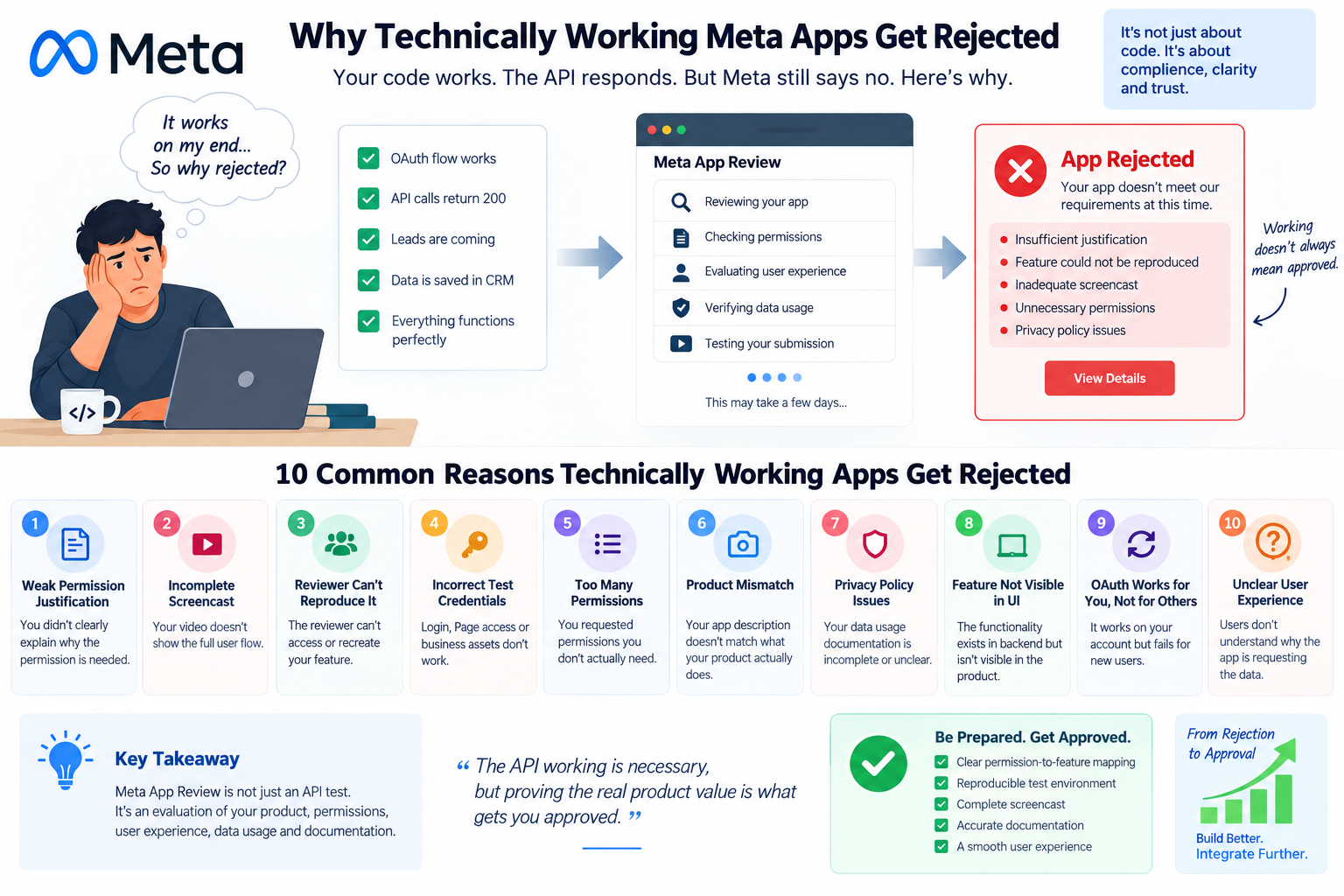
Meta App Review rejection can be confusing: your OAuth flow works, API calls return successful responses, permissions appear correctly configured, and the feature works perfectly in development—but Meta still rejects the app.
This happens because technical functionality is only one part of Meta’s App Review process.
Meta evaluates whether your app’s requested permissions, user experience, data usage, business purpose, and submitted evidence all align with its platform requirements. An application can therefore be technically correct and still fail review.
In this guide, we explain why technically working Meta apps get rejected, the most common App Review mistakes, how to prepare your submission, and how to troubleshoot a rejection step by step.
Quick Answer: Why Does Meta Reject a Working App?
A technically working Meta app can be rejected because Meta App Review is not simply an API functionality test.
Common reasons include:
- The requested permission is not clearly necessary.
- The submitted screencast does not demonstrate the complete permission flow.
- The reviewer cannot reproduce the feature.
- The test account or credentials do not work.
- The app requests more permissions than it actually uses.
- The privacy policy or data-use explanation is incomplete.
- The submitted use case does not match the actual product.
- The reviewer cannot access the required Facebook Page, Instagram account, Business Manager, or ad account.
- The app's user experience does not clearly explain why Meta data is being accessed.
- The implementation works for the developer but fails for a fresh external user.
The key principle is:
"The API works" does not automatically mean "the App Review submission is valid."
Meta App Review is the process through which Meta evaluates certain apps before they can receive advanced access to permissions or features that allow access to user, Page, business, advertising, Instagram, or other platform data.
For developers building:
- CRMs
- Marketing automation platforms
- Lead management software
- Social media management tools
- Advertising dashboards
- SaaS platforms
- Analytics platforms
- Customer support systems
- Facebook Lead Ads integrations
App Review can become an important part of launching the product.
For example, a CRM may need Meta permissions to retrieve leads from Facebook Lead Ads and automatically send those leads into its CRM pipeline.
The developer may have successfully implemented:
Facebook Lead Form → Meta Webhook → CRM → Lead Database
Yet the app can still be rejected if the reviewer cannot verify that the requested permission is being used appropriately.
One of the biggest mistakes developers make is treating permission approval as a technical exercise.
Suppose your CRM requests a Meta permission because it needs to retrieve leads.
Your backend may successfully execute the API request.
But the reviewer may ask:
Why does your application need this permission?
You need to clearly connect:
Permission → Feature → User Action → API Request → Result
For example:
Weak explanation
"We need this permission to access Facebook leads."
This does not explain enough about the actual user-facing functionality.
Stronger explanation
"Our CRM allows a business administrator to connect their Facebook Page and automatically import leads submitted through their Facebook Lead Ads forms into their CRM. The permission is used to retrieve lead information that the authorized business has chosen to synchronize with the CRM."
The important distinction is that you're explaining the actual product workflow, not simply describing an API.
The App Review screencast is one of the most underestimated parts of the submission.
Developers often record:
- Login
- Dashboard
- Click Facebook
- API works
- Done
But the reviewer needs to understand how the requested permission is actually used.
A better demonstration should show the complete journey.
Example CRM workflow
Step 1: Login to your CRM.
Step 2: Navigate to Meta integration.
Step 3: Click "Connect Facebook."
Step 4: Authenticate with Facebook.
Step 5: Select the appropriate Page/business asset.
Step 6: Show the permission or authorization flow.
Step 7: Return to the CRM.
Step 8: Show the connected Page.
Step 9: Demonstrate the feature that requires the permission.
Step 10: Show the resulting data inside the CRM.
This establishes a clear relationship between the permission and the product feature.
Your application may work perfectly on your computer.
That doesn't mean Meta's reviewer can reproduce it.
This is one of the most common reasons technically correct integrations fail.
Imagine your application requires:
- A specific Facebook Page
- A specific Business Manager
- A Lead Form
- An ad account
- A specific user role
- A pre-existing lead
- A special configuration
If the reviewer doesn't have access to those resources, the flow can fail.
Developer's perspective
"It works."
Reviewer's perspective
"I can't reproduce it."
For App Review, the second problem is what matters.
Another surprisingly common problem is a broken test environment.
Before submitting your app, test the exact credentials and workflow you provide to Meta.
Check:
- Username
- Password
- Test account
- Facebook account
- Business access
- Page access
- Instagram access
- Ad account access
- Required roles
- Two-factor authentication
- Expired credentials
- Account restrictions
Don't assume that because your own administrator account works, the reviewer will have the same access.
More permissions do not make your application look more powerful.
They can make the review harder.
Imagine your CRM only needs functionality related to lead retrieval but requests a large collection of unrelated permissions.
The reviewer now has to understand why every permission is necessary.
A better strategy is:
Request only what your feature actually requires.
Think of your permissions as a dependency graph:
If a permission isn't required somewhere in that chain, reconsider whether it belongs in the submission.
Meta reviewers evaluate what your application does.
If your App Dashboard says:
"Our application is a CRM that automatically imports Facebook leads."
But your screencast shows:
"A social media analytics dashboard."
You have created an inconsistency.
The reviewer now has to determine:
- What does the application actually do?
- Why is this permission required?
- Who uses it?
- What data is being accessed?
- How is the data used?
Your:
App description
Privacy Policy
Permission justification
Screencast
Actual product
should tell the same story.
Privacy requirements are particularly important for applications handling Meta user data.
Your privacy documentation should accurately describe relevant data practices, including where applicable:
- What information you collect
- Why you collect it
- How you use it
- How you store it
- How users can request deletion
- How users can contact you
- Third-party services involved in processing
- Data retention practices
For example, if your CRM retrieves lead information from Meta and stores that information in your database, your documentation should reflect the actual architecture.
Don't copy a generic privacy policy and assume it covers your implementation.
This is another important distinction.
Your backend might have:
and return:
Technically, everything works.
But if the reviewer can't see where this functionality exists in the actual product, the connection between the permission and the user benefit becomes unclear.
Meta App Review is fundamentally evaluating a product workflow, not just your backend.
The reviewer should be able to see:
Meta → Your Product → User Benefit
OAuth integrations frequently behave differently depending on the user's account, business assets, permissions, and authorization state.
Your own developer account may already have:
- Existing authorization
- Existing Page access
- Existing business permissions
- Existing tokens
- Existing app roles
Therefore, you may not be testing a fresh authorization flow.
A useful test is:
Test with a clean external account.
Ask:
"Could someone who has never connected this application complete the integration without my intervention?"
If the answer is no, your onboarding flow needs more work.
Good integrations make data access understandable.
Consider two experiences.
Experience A
Button:
Connect Facebook
Then suddenly the application requests several permissions.
Experience B
Before authorization:
Connect your Facebook Page to automatically import new Lead Ads submissions into your CRM.
The second experience provides context.
Your UI should make the purpose of the integration clear before authorization wherever appropriate.
Before submitting an App Review request, create a table like this internally.
PermissionProduct FeatureAPI UsageUser BenefitPermission AFacebook connectionAPI endpointConnect PagePermission BLead synchronizationLead APIImport leadsPermission CCampaign reportingMarketing APIView campaign metrics
Then ask:
Can I demonstrate every row in the App Review video?
If you cannot, your submission probably needs improvement.
Before clicking Submit for Review, verify the following.
Application
- App name is correct
- App domain is correct
- Business information is accurate
- Privacy policy URL works
- Data deletion instructions are available
- Contact information is valid
Permissions
- Every permission has a real product use
- No unnecessary permissions are requested
- Each permission can be demonstrated
- Permission descriptions match the actual feature
Product
- Feature is visible in the UI
- User can reproduce the workflow
- Integration works with a fresh account
- Error handling works
- Authorization flow is understandable
Screencast
- Login is demonstrated
- Integration entry point is shown
- Authorization flow is shown
- Relevant Meta asset is selected
- Requested permission's functionality is demonstrated
- Result is visible inside the application
- Video is clear and reproducible
Reviewer Access
- Test credentials work
- Test account has required access
- Facebook Page is accessible
- Business assets are configured
- Required test data exists
- No manual developer intervention is required
Don't immediately change your entire codebase.
First identify what category of problem the rejection represents.
Category 1: Permission problem
Ask:
Does the product actually require this permission?
Category 2: Evidence problem
Ask:
Did the screencast clearly demonstrate it?
Category 3: Reproducibility problem
Ask:
Can an independent reviewer reproduce the workflow?
Category 4: Product problem
Ask:
Is the feature actually visible and usable?
Category 5: Documentation problem
Ask:
Do the App Review description and privacy documentation accurately explain the data flow?
This classification can save considerable development time.
Imagine you're building a CRM that imports Facebook leads.
Your architecture could look like:
Your App Review submission should explain this workflow in human terms.
For example:
A business connects its Facebook Page to the CRM. When a user submits a lead form associated with that Page, the CRM retrieves the authorized lead information and creates a corresponding lead record. The CRM then allows the business's sales team to manage the lead through its internal pipeline.
This is significantly clearer than simply saying:
"We use the Graph API to retrieve leads."
Normal API testing asks:
Does the API request work?
App Review asks a broader set of questions:
Why does your application need this capability?
How does the user initiate it?
What happens after authorization?
What data is accessed?
How is the feature used?
Can the reviewer reproduce it?
Does the submitted evidence correspond to the requested permission?
That is why a successful API response is not sufficient evidence of App Review compliance.
Mistake #1: "The API returns 200, so we're ready."
A successful HTTP response doesn't prove your App Review submission is complete.
Mistake #2: "I'll request every permission now."
Request only permissions your product actually needs.
Mistake #3: "The reviewer can figure it out."
Don't make the reviewer reverse-engineer your product.
Mistake #4: "My admin account works."
Test with an account that represents the reviewer experience.
Mistake #5: "The screencast is just a formality."
Treat the screencast as technical evidence.
Mistake #6: "I'll explain everything in the description."
Show the actual workflow in the product.
Why does Meta reject an app even when the API works?
Because Meta App Review evaluates more than API functionality. The reviewer also considers the requested permission's necessity, the product workflow, documentation, user experience, reviewer access, and submitted evidence.
How can I reduce Meta App Review rejection risk?
Build a clear permission-to-feature mapping, request only necessary permissions, create a reproducible reviewer environment, provide working test credentials, and demonstrate the complete workflow in your screencast.
Does Meta App Review require a screencast?
For permissions and features requiring review, Meta asks developers to provide evidence demonstrating how the requested functionality is used. The exact requirements can vary by product and permission.
Can a technically correct OAuth implementation still be rejected?
Yes. OAuth can function correctly while the App Review submission fails because the reviewer cannot reproduce the flow, the permission justification is insufficient, or the requested permission does not clearly correspond to a user-facing feature.
Should I request all Meta permissions at once?
Generally, you should request only the permissions your application genuinely requires for its functionality. Unnecessary permissions make the review scope larger and can make your use case harder to explain.
What should my Meta App Review video show?
The video should demonstrate the relevant user journey from entering the feature through authorization and into the functionality that uses the requested permission. The exact evidence requirements depend on the permission or product being reviewed.
What is the biggest difference between API testing and App Review?
API testing primarily verifies whether your integration works. App Review additionally evaluates whether the requested platform capability is appropriately used within the actual product and whether Meta can verify that usage.
Why can't Meta reviewers access my feature?
Common causes include incorrect test credentials, missing Page or business access, unavailable test data, broken OAuth configuration, account restrictions, or a workflow that depends on manual intervention from the developer.
A Meta App Review rejection does not necessarily mean your code is broken.
In many cases, the application is technically functional, but the permission, product workflow, documentation, reviewer access, and evidence don't line up clearly enough.
Think of App Review as a chain:
Permission → Product Feature → User Action → API Usage → Data → User Benefit → Evidence
If every part of that chain is clear and reproducible, your submission becomes much easier for a reviewer to understand.
The goal isn't simply to prove:
"Our API works."
The goal is to demonstrate:
"This is a real product feature, this permission is necessary for it, this is how an authorized user uses it, this is the data involved, and here is exactly how the reviewer can reproduce it."
That distinction is one of the most important concepts for developers building Meta integrations, CRMs, marketing platforms, and SaaS products.
Related Technical Topics
If you're building or troubleshooting a Meta integration, the next technical areas worth understanding are:
- Meta Tech Provider Access Verification
- Meta Business Verification vs App Review
- Meta permission dependency mapping
- Facebook Lead Ads → CRM integration
- Meta Webhooks and event reliability
- Facebook Login for Business OAuth architecture
- Meta Conversions API (CAPI) event deduplication
- Meta Graph API rate limits
- Access-token lifecycle and revocation
- Multi-tenant Meta SaaS architecture